
Automate training on any subject with Compulsory Courses
You may want to train all end users on more areas than what are covered in the core infosec Auto Enrol courses. Compulsory Courses allow you to automate enrolment of any course in SMLearn including modified courses, whether from the library or one you've created yourself with Course Builder.
Automating with Compulsory Courses and Auto Enrol
Auto Enrol covers all core areas of cybersecurity, so you don't need to set any core security courses as compulsory if you already have Auto Enrol enabled. Compulsory Courses work well with additional courses that are specific to your organisation or requirements, but aren't already included in Auto Enrol.
How do Compulsory Courses work?
Compulsory Courses allow you to easily automate training.
- Compulsory Courses are automatically sent to all new end users you upload onto the platform
- End users will automatically be sent reminders to complete their compulsory courses until they finish them
How to automate training with Compulsory Courses
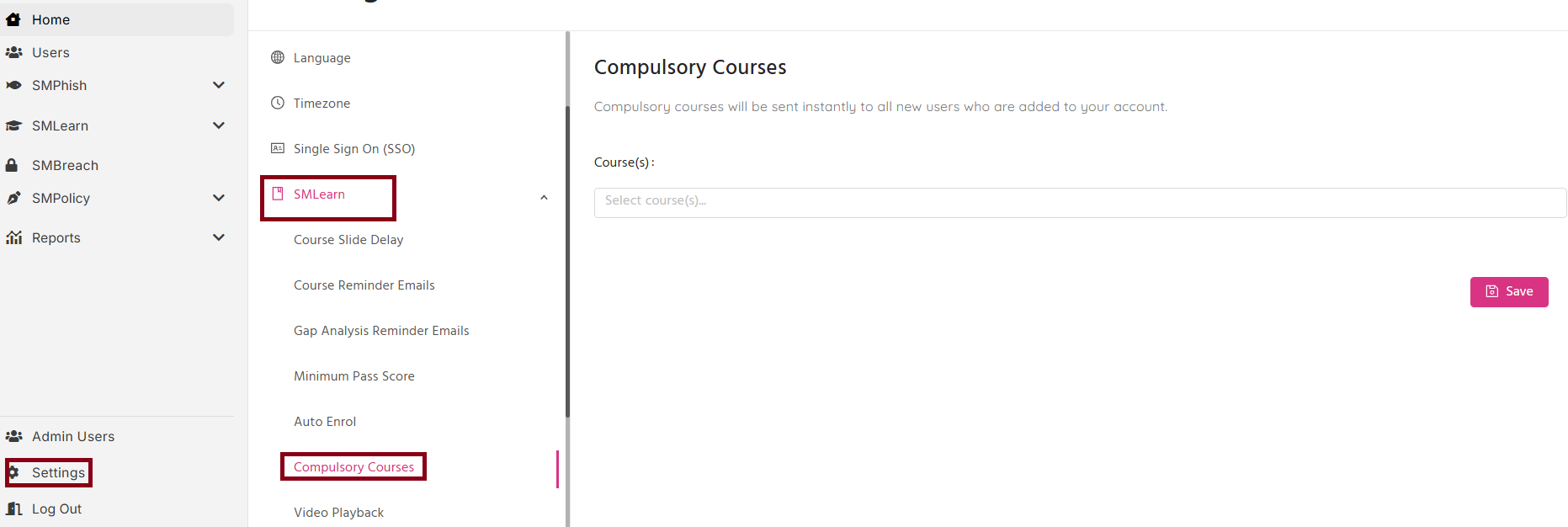
- Open the platform settings
- Under Setting go to SMLearn, click Compulsory Courses
- In the drop-down menu, select the course/s you wish to set as mandatory
- Click the Save button
Next steps
- Learn more about automating training on SMLearn