
Tracking your users' security awareness training performance
As your users advance through their security awareness training program, SMLearn tracks a range of metrics to give you clear visualizations of user engagement and performance.
Available Metrics
SMLearn reporting includes the following metrics:
-
Course scores
The percentage of correct answers achieved by a user for a completed course.
-
Course participation
The percentage of assigned users who have started a course.
-
Course completion rate
The percentage of assigned users who have completed a course.
How Can These Metrics Be Filtered?
SMLearn allows you to view training metrics at different levels, depending on the insight you are looking for:
-
Individual users
View detailed performance data for a specific user, including course grades and completion status.
-
Groups
Review participation and completion metrics for defined user groups (for example, department-based groups such as Finance or HR).
-
Organization-wide
View high-level participation and completion metrics across your entire company to understand overall program adoption.
Where to Find Your Users’ SMLearn Performance Metrics
SiberMate Dashboard
- Where to find this: Access your SiberMate portal > SMLearn > Courses Report
- Metrics available: Overall courses outstanding, overall courses completed, and overall course participation.
You can view a quick snapshot of your organization’s SMLearn progress, so you can see the adoption rate of your programs directly from your dashboard Users Tab.

- Where to find this: Access your SiberMate portal > Select 'Users' in the left navigation bar.
- Metrics available: Individual SMLearn grades and course status (i.e., enrolled courses, courses started, courses completed, course grade).
In the Users section of your SiberMate app, you can view the individual SMLearn performance of each of your users.
For easy-to-digest insights, you’ll see each user’s SMLearn grades displayed in a radar graph.
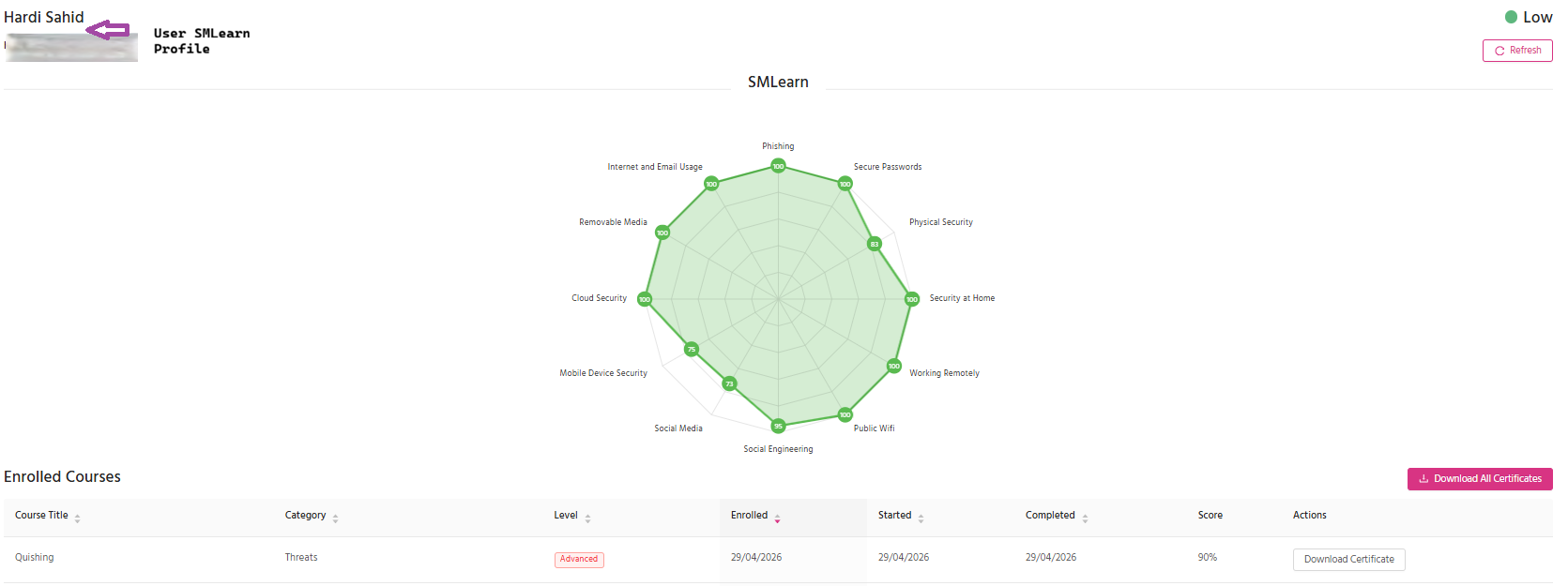
Here you can also see the status of their courses, from enrolment to completion and final grade.