Setting a Minimum Pass Score
A minimum pass score determines what percentage of questions for users must answer correctly to pass a course.
What does the minimum pass score do?
Setting a minimum pass score ensures that the users only 'pass' or finish a course when they answer the required number of questions correctly. If a user fails to answer the required number of questions correctly, they will be asked to retake the course. The user may retake the course immediately or at a later date. However, if they do not finish the course with the required passing grade, they will continue receiving reminder emails to retake the course.
What happens to courses already taken when I change the minimum pass score?
Changing the minimum pass score only affects courses moving forward. It has no effect on courses that have already been taken by your users or on the reporting of those courses.
What should I set the minimum pass score to?
Setting the minimum pass score higher will ensure that your users must read through and engage with the course content as they go through it. Setting it too high, however, may be seen as overly strict, because it is easy for any user to make a mistake or misunderstand one question out of a set of ten. We normally see customers set the minimum pass score to around 85%, as this ensures strong retention of learning without being overly strict or punitive.
How do I set the minimum pass score?
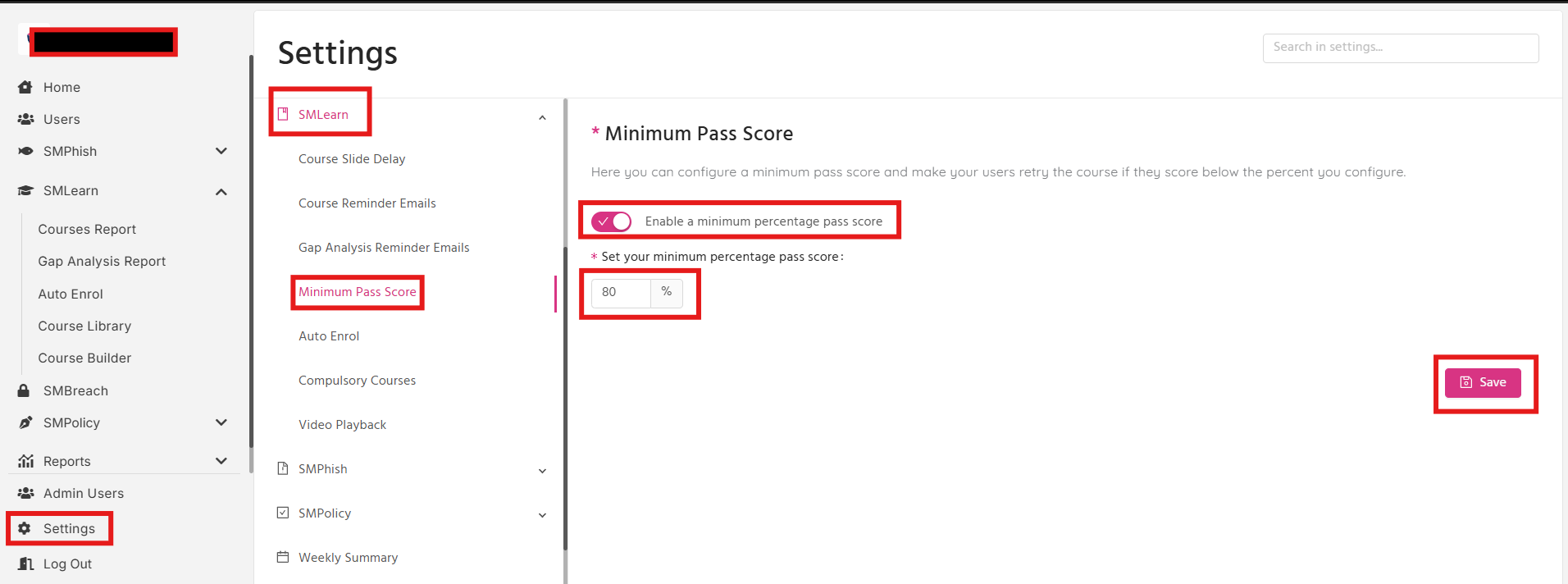
You can set the minimum pass score in your settings, under the SMLearn tab.
Navigate to: Settings > SMLearn > Minimum Pass Score. Then tick Enable a minimum percentage pass score, set the desired percentage, and click Save.